Aion (灵汐):自动退出真正闲置的应用,不打断下载、音乐或通话 / Aion: Context-aware auto-quit for macOS
Aion (灵汐) - 重新定义 macOS 后台自动化 / Redefining macOS Background Automation
[CN] 🚀 开发者自白:为什么有了灵汐 (Aion)?
作为一名重度 Mac 用户,我一直对“自动清理”类工具又爱又恨。大多数工具在后台杀进程时都太“暴力”了:下载到一半的应用、正在开会的 Zoom,甚至是在后台跑着 AI 任务的浏览器,常常因为几分钟没被点过就被强行收割。
我想要的是一个能感知上下文、能跟我建立信任感的助手。它应该像一个懂行的管家:当你真在忙正事时(哪怕应用在后台),它保持安静;只有当一个应用彻底变成“僵尸”状态时,它才出面收拾。
这就是 Aion (灵汐) 的由来——它不仅是清理工具,更是一场关于“自动化中‘信任感’边界”的编程实践。
核心理念
信任感是自动化的基石。 Aion 的核心目标不是多关几个后台,而是让你放心地把“关闭后台”这个决定权交给它,而不用担心它会在你下载 99% 时突然断掉你的浏览器。
✨ 核心功能详解
🎯 智能感知与守护
1. Smart Guards (智能护卫)
灵汐默认是偏保守的:会先判断应用当前在做什么,再决定是否退出。
- 自动保护正在下载的应用:网络活动会让应用处于保护状态,而非过早退出。
- 自动保护音乐与视频播放:正在播放媒体的应用受保护。
- 自动保护麦克风和摄像头占用:你正在开会、通话或录音时,相关应用受保护。
2. AI App Protection (AI 应用保护)
当本地 AI / Agent 工作流正在使用某个应用时,灵汐可以把它保护起来,而不是把它当成普通后台闲置应用来清理。
📊 信任链路建设
1. 活动记录 (Activity Log)
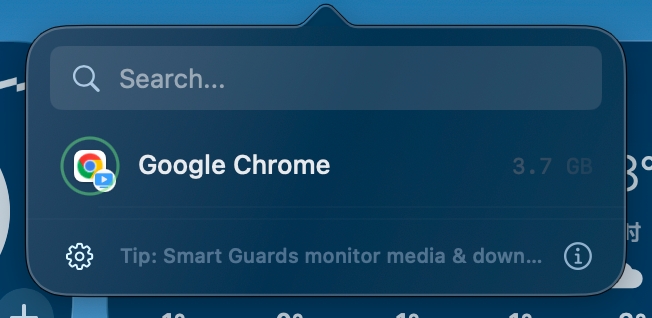
这是 Aion 最近几个版本中最重要的更新。它公开了自动化的“黑盒”,你可以清晰地查看到:刚才哪个应用被尝试关闭了,以及为什么它被保留了下来。
2. 瞬时任务 (Instant Task)
针对计算器、词典等小工具,灵汐可以让这类短时工具用完即走,不留痕迹。
为什么灵汐比纯计时型工具更稳妥?
很多工具只看“闲置了多久”,灵汐在决定前还会判断“它还在做正事吗”:
- 浏览器下载:超时后计时型工具仍可能清理,灵汐则会识别下载活动。
- 系统清理:灵汐可以自动清理残留安装盘 (DMG) 和关闭无窗口的 Dock 应用。
更多信息请访问官网:aion.7caifei.com
[EN] 🚀 Project Introduction
On macOS, we often face a dilemma: to keep the system smooth, we want to clear redundant background processes; but to avoid interrupting the workflow, we fear that tools might “mistakenly kill” critical tasks running in the background (such as large file downloads, video rendering, or meetings).
Aion is a background automation assistant designed specifically to solve this pain point. It no longer simply relies on “idle time” to decide whether to close an app, but instead judges whether an app is “truly idle” through a deep context-aware system.
Core Philosophy
Trust is the foundation of automation. Aion’s core goal is not just to close more background apps, but to let you confidently hand over the decision of “closing background apps” to it, without worrying that it will suddenly cut off your browser while your download is at 99%.
✨ Core Features
🎯 Smart Guards & Context-Awareness
Aion is conservative by design. It checks what the app is doing before it quits anything.
- Protects Active Downloads: Network activity keeps the app protected instead of being quit too early.
- Protects Music and Video Playback: Apps currently playing media are protected.
- Protects Mic and Camera Activity: If you are on a call or recording, the relevant app stays protected.
2. AI App Protection
Aion can protect an app while a local AI or agent workflow is actively using it, instead of treating that app like ordinary background idle time.
📊 Building the Trust Loop
1. Activity Log
This is the most important update in recent versions. It opens up the “black box” of automation, allowing you to clearly see: which app was attempted to be closed just now, and why it was retained.
2. Instant Task Mode
For small utilities like calculators or dictionaries, Instant Task mode lets short-lived apps disappear right after use.
Why Aion feels safer than timer-based tools?
Most tools only look at “how long it has been idle”. Aion looks at “whether it is still doing productive work” before deciding:
- Browser Downloads: Timer-based tools might still clean them up after expiration; Aion recognizes the download activity.
- System Cleanup: Aion can automatically clean up leftover installer DMGs and close Dock apps with no windows.
🌟 Creator’s Note
A background tool itself should not become a new background burden.
We’ve optimized Aion’s resource usage to ensure it remains nearly invisible:
- Visibility Driven: Interface logic only refreshes when the menu bar or HUD is visible.
- Minimal Resource Footprint: All judgments are completed locally on your Mac, ensuring privacy and performance.
For more information, visit the official website: aion.7caifei.com